![XUno logo White with border.png]](https://docs.xuno.com.au/hs-fs/hubfs/XUno%20logo%20White%20with%20border.png?height=35&name=XUno%20logo%20White%20with%20border.png)
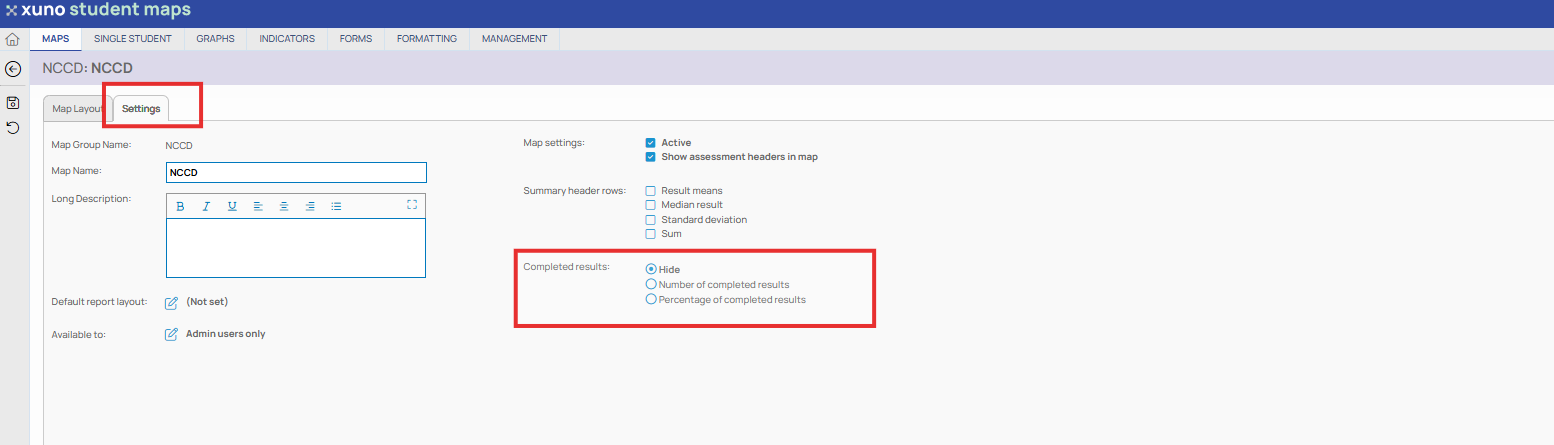
When entering data into a Student Map, you can include a column that will inform the user of how much data has been entered into all the editable columns of a map. This count can be shown either as a percentage of the total number of editable columns completed, or the number of editable columns with data.
• This option is enabled in Edit Map Layouts. You can select to display no count, a percentage completed count or a number of columns completed count.
• This option is usually used when entering data into a student report map. This will inform users on which students have not had all their reporting data entered.
• When all data has been entered into a map, the percentage or the number of completed columns value will show in green.