![XUno logo White with border.png]](https://docs.xuno.com.au/hs-fs/hubfs/XUno%20logo%20White%20with%20border.png?height=35&name=XUno%20logo%20White%20with%20border.png)
New “Update Class Roll” Setting in Scheduled Program Details
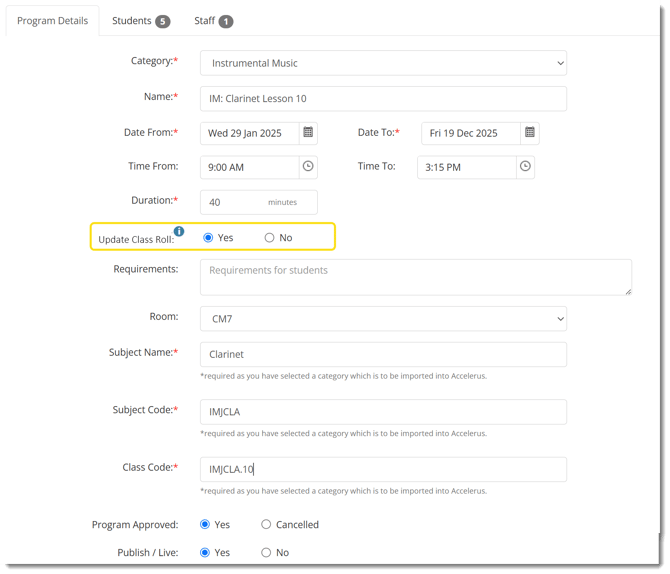
A new field—Update Class Roll—has been added to the Scheduled Program Details page.
-
The default value is “No”
-
When set to No, attendance marked within the Scheduled Program will not update the student’s class roll.
-
When set to Yes, marking a student as Present will automatically update their class roll to Present, regardless of the existing roll status.
How Automatic Updates Work
Below are examples of how the system will behave when a scheduled program has the Update Class Roll set to Yes and the teacher marks a student Present:
| Class Roll | Scheduled Program | Result |
| Unmarked | Present | Class Roll updates to Present |
| UA (or any reason with 'Treat As UA') | Present | Class Roll updates to Present |
| Approved Absence (or any reason with 'Treat As Approved Absence') | Present | Class Roll updates to Present |
| Late Arrival (or any reason with 'Treat As Present') | Present | No updates — the Class Roll already reflects a Present status |
If Update Class Roll is set to Yes, marking a student’s attendance as Present will automatically update the student’s class roll as Present. Please note that each student can have a different date and lesson time.
Updated Student Attendance Interface in Scheduled Programs
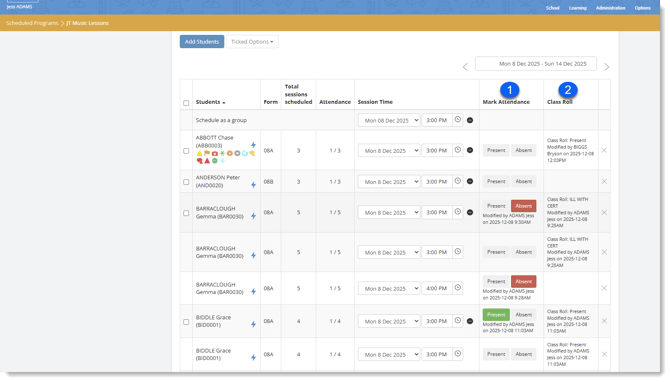
1. To simplify marking attendance, the Students page now includes only two buttons:
-
Present
Please refer to How Automatic Updates Work section above for a detailed description on how the Present button will update the student's class roll. Note that Class Roll will update according to the student’s scheduled session date and time. -
Absent
No update will be applied to the class roll.
Additional details added
- The Modified By field will show the staff member who made the change and the timestamp when Present or Absent was clicked.
2. A new Class Roll column has been added to provide more context and visibility to the person marking the scheduled program's roll.
This column displays:
-
The student’s Class Roll attendance status
-
Modified by staff name and timestamp
Enhancements to the Scheduled Programs Attendance Report
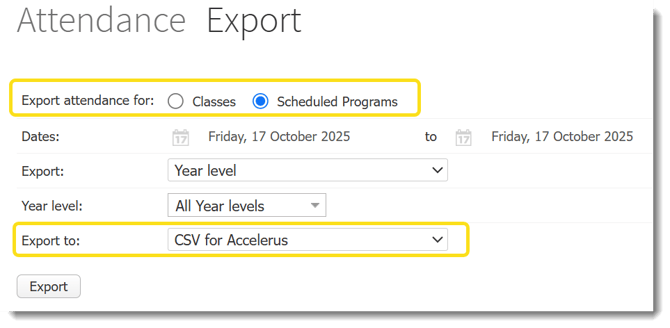
In Administration > Export Attendance > Scheduled Programs > CSV for Accelerus, several improvements have been introduced:
New & Updated Columns in CSV
-
Student Name column added (after Student Code)
-
Approved Absence and Unapproved Absence counts now pull directly from the Class Roll within the specified date range and periods:
-
Approved Absence includes all reasons where Treat As = Approved Absence
-
Unapproved Absence includes all reasons where Treat As = Unapproved Absence
-
-
Parent Absence Reason column added at the end, sourced from the student’s Class Roll.
These changes ensure more accurate attendance reporting and better alignment with school records.