![XUno logo White with border.png]](https://docs.xuno.com.au/hs-fs/hubfs/XUno%20logo%20White%20with%20border.png?height=35&name=XUno%20logo%20White%20with%20border.png)
The School-Wide Positive Behaviour Support (SWPBS) module in Xuno helps schools record, monitor and manage student behaviour by recognising positive behaviours and tracking minor and major incidents.
This feature provides teachers with a quick and easy way to record student behaviour directly from the Staff Dashboard.
The module allows schools to:
- Recognise and record positive student behaviours aligned with school values.
- Record and monitor minor and major behavioural incidents.
- Track behaviour records at both individual teacher and school levels.
- Generate reports to monitor behaviour trends and patterns.
- Compare positive behaviour recognition against minor and major incidents.
The aim is to encourage a positive school environment by increasing recognition of positive behaviours and providing schools with useful insights into student behaviour.
Enabling the SWPBS Module
The SWPBS module must first be enabled by the Xuno team.
Once enabled, the following options become available:
Staff Dashboard
- A new SWPBS tab will appear on the Staff Dashboard.
- Teachers can access the Positive, Minor and Major behaviour recording forms.
Behaviour Lists and School Values
The SWPBS module uses predefined behaviour types and school values to ensure consistency when recording student behaviour.
Xuno Administrators can manage these lists under Lists & Options > Incidents.
- SWPBS Types (What): Defines the behaviour categories available when recording Positive, Minor and Major entries.
- School Values (Why): Defines the school values associated with positive behaviour recognition.
These lists help schools align their behaviour recording process with their own SWPBS framework and expectations. Default fields such as Where, When and Why has been set. You may add more fields if you wish when modifying fields for Positive, Minor and Major entries.
Managing Staff Permissions
Xuno Administrators can manage access to SWPBS recording forms and reports through User Groups & Permissions.
Incident Permissions
Under Staff > Incidents, administrators can assign access to the following:
- SWPBS Positive
- SWPBS Minor
- SWPBS Major
Each permission can be configured according to the staff member's responsibilities.
Recording Student Behaviour & Viewing SWPBS Records and Reports
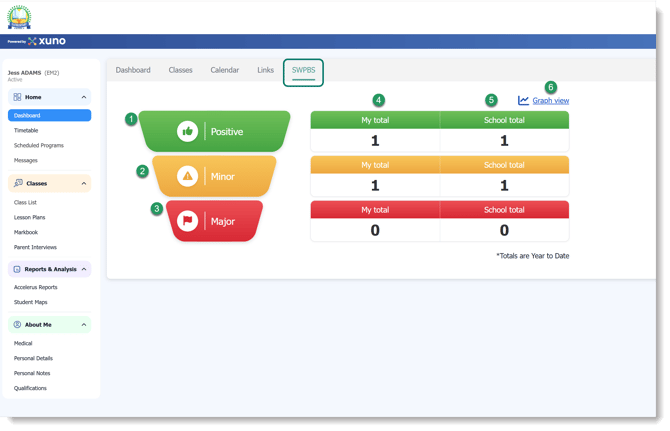
Teachers can access the SWPBS module from the SWPBS tab on their Staff Dashboard.
There are three types of behaviour records available:
1. Positive Behaviour
Use this option to recognise and record positive student behaviour.
To record a positive behaviour:
- Click Positive.
- Select the relevant student or students.
- Select the applicable school value (Why).
- Click Record Positive to save the entry.
2. Minor Behaviour
Use this option to record minor behavioural incidents.
To record a minor incident:
- Click Minor.
- Select the relevant student or students.
- The incident time will automatically populate.
- Select the incident location from the dropdown list.
- Confirm the severity, which defaults to Minor and cannot be edited.
- Select the applicable behaviour from the predefined list.
- Submit the incident form.
3. Major Behaviour
Use this option to record major behavioural incidents.
To record a major incident:
- Click Major.
- Select the relevant student or students.
- The incident time will automatically populate.
- Select the incident location from the dropdown list.
- Confirm the severity, which defaults to Major and cannot be edited.
- Select the applicable behaviour from the predefined list.
- Enter any additional comments or relevant details.
- Submit the incident form.
Important: The severity of a Minor or Major incident is predetermined and cannot be changed once the form is selected. If an incident has been recorded under the wrong severity, the incorrect entry must be deleted and a new entry created using the correct behaviour form.
The SWPBS tab also provides an overview of recorded behaviours and allows teachers and school administrators to monitor activity.
Two reporting options are available:
4. My Total
- Displays the Positive, Minor and Major behaviour records entered by the logged-in staff member for the current year.
- Clicking the relevant number opens the corresponding report in a new browser tab.
5. School Total
- Displays the Positive, Minor and Major behaviour records entered by all staff members for the current year.
- Clicking the relevant number opens the corresponding school report in a new browser tab.
Access to these reports depends on the staff member's assigned permissions.
6. SWPBS Graph View
The Graph View provides a visual representation of recorded student behaviours.
This allows schools to identify behaviour patterns and monitor the relationship between positive behaviour recognition and minor or major incidents.
To access the Graph View, click the Graph View link in the SWPBS section. The report will open in a new browser tab.
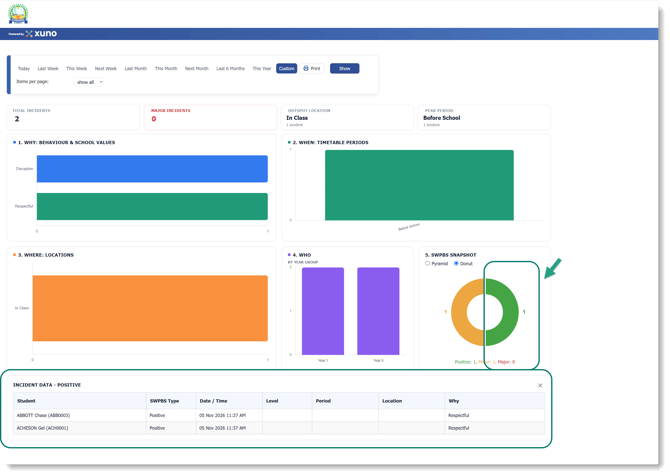
This view helps schools evaluate their behaviour support strategies and identify opportunities to encourage more positive student behaviour.
As highlighted in the image above, clicking on any of the highlighted figures will display the corresponding records, providing more details about the selected behaviour category.
Report Permissions
Under Staff > Reports, an additional SWPBS permission is available.
The available permission levels are:
| Permission | Access |
|---|---|
| No Access | Cannot access SWPBS reports. |
| Read Only (Own) | Can view My Total reports only. |
| Read Only (Own + Others) | Can view My Total, School Total and Graph View reports. |
Administrators should ensure that staff members are assigned the appropriate permissions based on their roles and responsibilities.
Summary
The Xuno SWPBS module provides schools with a centralised way to recognise positive student behaviour, record behavioural incidents and monitor overall behaviour trends.
By making behaviour recording accessible directly from the Staff Dashboard, teachers can quickly document student behaviour while schools gain greater visibility of their progress towards creating a positive and supportive learning environment.