![XUno logo White with border.png]](https://docs.xuno.com.au/hs-fs/hubfs/XUno%20logo%20White%20with%20border.png?height=35&name=XUno%20logo%20White%20with%20border.png)
Schools can provide parents, students, and staff with downloadable PDF receipts and invoices for event payments. Schools can use the built-in document templates or upload their own branded templates for individual events.
Overview
The Payment Receipts & Invoices feature allows:
- Staff to download receipts and invoices from an event's Students grid.
- Parents and students to download invoices for outstanding payments and receipts for completed payments from the portal.
- Schools to enable receipts and invoices independently.
- Schools to use a built-in template or upload their own branded
.docxtemplate. - Staff to download invoice or receipt documents for multiple students at once as a ZIP file.
This feature is off by default and must be enabled by a staff member with permission to edit payment settings.
Enable Receipt and Invoice Downloads
To enable the feature:
- Go to Software Settings > Payments Settings.
- Turn on Allow Receipt PDF downloads to enable receipt downloads.
- Turn on Allow Invoice PDF downloads to enable invoice downloads.
The two settings work independently. For example, a school can enable invoices without enabling receipts.
When a setting is turned off, the related download options and icons are not shown to staff, parents, or students.
Staff: Download Receipts and Invoices
Staff can download payment documents directly from an event's Students tab.
- Open the relevant Event.
- Go to the Students tab.
- Select one or more students.
- Open Ticked Options.
- Select Download Payment Receipt or Download Payment Invoice.
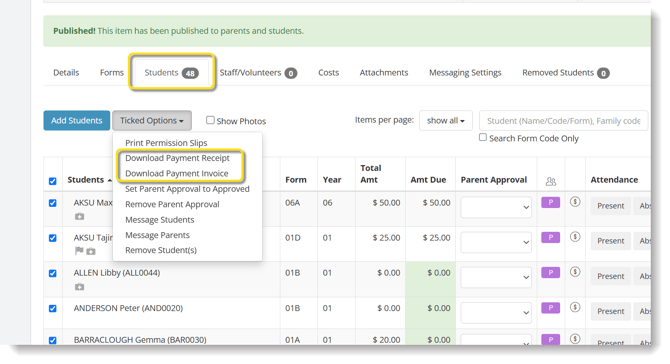
When multiple students are selected, the documents are downloaded together as a ZIP file.
Receipts
Receipts represent the entire payment transaction.
For example, if a parent pays for two children's excursions in a single transaction, the receipt includes everything covered by that transaction—not just one event or one student.
A bulk receipt download therefore generates one receipt PDF per distinct paid transaction.
Invoices
Invoices are specific to a student's outstanding balance for an event.
A bulk invoice download generates an invoice PDF for each applicable student/event balance.
Customise the Document Template
Schools can use their own branded receipt or invoice templates when generating documents.
For an Individual Event
To customise the template for a specific event:
- Open the relevant Event.
- Go to the Attachments tab.
- Upload the appropriate
.docxtemplate. - The uploaded template will be used when generating the corresponding PDF.
For General Use
To customise the template used across events:
- Click the cogwheel and select Award, Letter & Email.
- Select Events from the drop-down menu.
- Download the existing template and modify it as required.
- Upload the updated template to replace the existing document.
Note : If no custom template has been uploaded, the system will automatically use the built-in default template.
Important❗ Please review the default invoice and receipt templates before using them, as you may wish to include additional information specific to your school in the invoice or receipt documents.
Parent and Student Portal
Parents and students can download their payment documents directly from the portal.
Download an Invoice
For an item that still has an amount owing:
- Open the Outstanding tab.
- Find the relevant event or payment item.
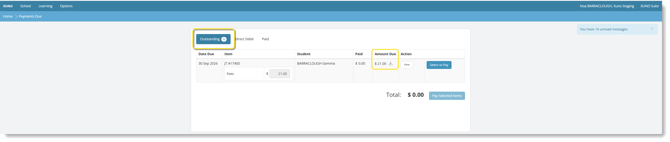
- Select the download icon next to the amount due.
- The invoice is downloaded as a PDF.
Invoices provide a record of the specific outstanding balance for that student and event.
Download a Receipt
For a payment that has already been made:
- Open the Paid tab.
- Find the relevant transaction.
- Select the download icon next to the transaction number.

- The receipt is downloaded as a PDF.
The receipt covers the whole transaction. This means that if one payment covered multiple events or multiple children, all items included in that transaction appear on the same receipt.
Privacy and Security
Payment documents are restricted to the relevant family.
Parents and students can only download documents belonging to their own family. Access is checked when the document is requested, so changing or manually editing a download link cannot be used to access another family's receipt or invoice.
When There Is Nothing to Download
If there is no document to generate—for example, when a receipt is requested for an item that has not been paid—the system displays a clear message explaining why the document cannot be generated.
You will not be shown an empty or blank document.
Existing Event Form Templates
The existing Printable Event Form Template feature continues to work alongside downloadable payment receipts and invoices.
Important Notes
- Receipt and invoice downloads are disabled by default.
- Receipts and invoices can be enabled independently.
- Only staff with the appropriate payment settings permission can enable or disable the features.
- Custom templates must be uploaded as
.docxfiles. - Receipts represent the full payment transaction.
- Invoices represent a specific student's outstanding event balance.
- Parents and students can only access their own family's payment documents.