![XUno logo White with border.png]](https://docs.xuno.com.au/hs-fs/hubfs/XUno%20logo%20White%20with%20border.png?height=35&name=XUno%20logo%20White%20with%20border.png)
Booking the PTI session by parents via the app/portal
Parents can make their own booking via the Xuno Family portal or app. The menu option for PTI booking is School → Communication → Parent Teacher Interviews.
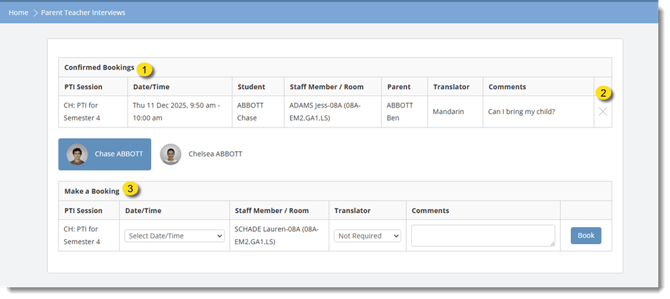
1. Confirmed Bookings
Shows all appointments that have already been successfully booked.
Parents can review details such as date, time, teacher, and comments added.
2. Delete Bookings
The “X” button allows parents to cancel an existing booking.
Once clicked, the appointment is removed from the confirmed list.
3. Make a Booking
This section is where parents choose a time slot and create a new Parent-Teacher Interview booking.