![XUno logo White with border.png]](https://docs.xuno.com.au/hs-fs/hubfs/XUno%20logo%20White%20with%20border.png?height=35&name=XUno%20logo%20White%20with%20border.png)
This feature allows schools to create custom alerts for contacts, enabling staff and teachers to easily identify important warnings, restrictions, or notes when accessing student family information. Alerts are displayed prominently within the contact profile to improve visibility and staff awareness.
To configure custom alerts, navigate to:
Options > Lists & Options > Contacts > Custom Alerts & Icons
Once a custom alert has been created, it can be assigned to a contact by opening the student profile and selecting the pencil icon to edit the student’s family/contact information.
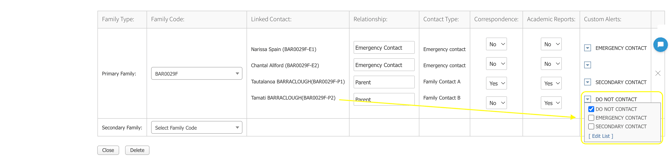
Once the alert has been assigned, return to the Student Profile and the selected alert will now be clearly visible within the contact information section.