![XUno logo White with border.png]](https://docs.xuno.com.au/hs-fs/hubfs/XUno%20logo%20White%20with%20border.png?height=35&name=XUno%20logo%20White%20with%20border.png)
What is a One-Time Password (OTP)?
A One-Time Password (OTP) is a temporary login code sent to a user’s email address. The code can only be used once and expires after a specific time period, providing a secure way for parents to access their XUNO account.
How the OTP Login Process Works
1. Select “Sign-in with one-time password”
On the XUNO Family App sign-in screen, parents will see a new option:
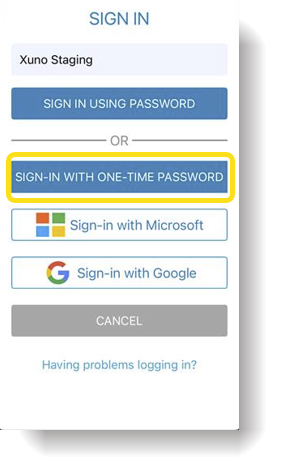
When a parent selects this option, they are taken to a page where they will be asked to enter:
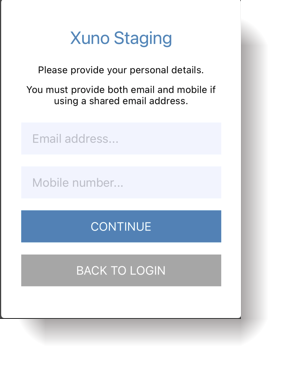
Note:
Some parents may share the same email address. If this is the case, then the mobile number must be entered. The mobile number acts as a second verification field to ensure the correct parent account is identified.
2. Requesting the OTP
After entering the email address and mobile number:
-
The information is sent securely to the XUNO server.
-
The system generates a temporary password (OTP) for the user.
-
A confirmation message appears advising the user that an email has been sent with their login code.
-
The user clicks Continue and is returned to the sign-in page.
3. Receiving the OTP Email
The parent will receive an email containing the temporary login code.
4. Signing In Using the OTP
The parent can now return to the login screen and sign in using:
-
Their username or email, and
-
The One-Time Password (OTP) sent via email.
Once logged in successfully, the parent will have access to their XUNO Family App or Parent Portal.
OTP Security and Expiry Rules
To ensure security, the OTP system follows these rules:
-
The OTP is a random 8-character password.
-
It includes a mix of numbers, lowercase letters, and uppercase letters.
-
The OTP expires after 15 minutes from the time it was generated.
- The OTP may only be used once.
-
If the OTP expires before being used, the parent must request a new OTP.
-
Parents should never share their OTP with anyone.
Handling Shared Email Addresses
If two parents share the same email address, the system uses the mobile number to identify the correct account.
In this case, the email will include the username so the parent knows exactly which account to use when logging in.
Family App Login Behaviour
After a parent logs in successfully using the OTP:
-
The Family App remains logged in.
-
Parents do not need to sign in every time the app is opened, provided the app remains installed on the device.